Create organizations and branches
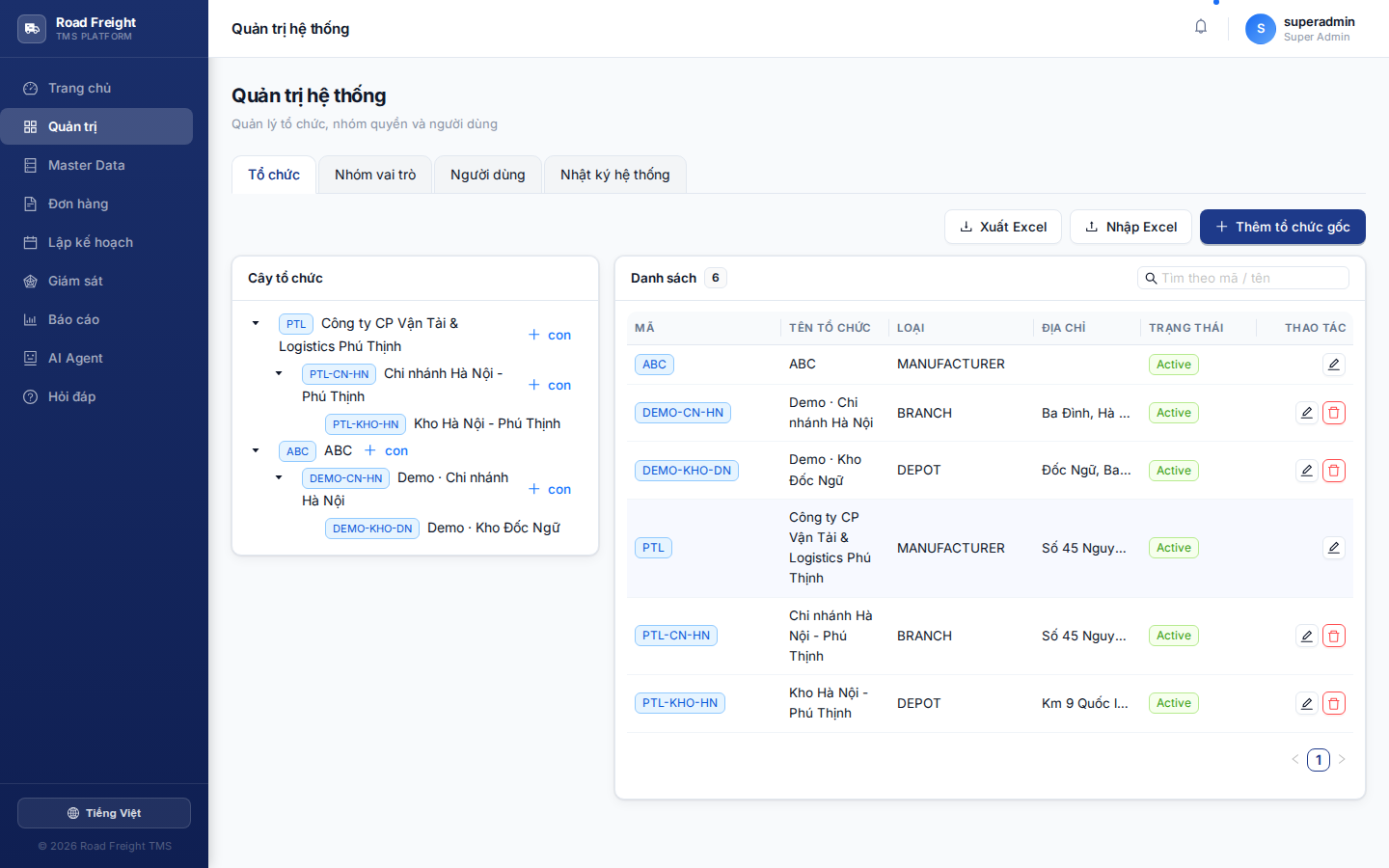
After registering, you need to build an organization tree matching your real company structure. This is the foundation — every user, order, vehicle... belongs to a specific organization.
Concepts
Road Freight TMS uses a multi-tenant tree model:
[Parent company]
  ├─ [Branch A]
  │   ├─ [Depot A1]
  │   └─ [Depot A2]
  └─ [Branch B]
      └─ [Depot B1]
- Parent company = root, auto-created when you registered
- Branch = regional unit (HN, HCMC, DN...)
- Depot = physical unit with real coordinates, dispatch origin
When do you need branches & depots?
| Scale | Recommended structure |
|---|---|
| One depot | Root + 1 depot — simplest |
| 2-3 depots in one city | Root + multiple peer depots |
| Multi-province | Root → Branch (per province) → Depot |
| Conglomerate | Root → Subsidiary → Branch → Depot |
Step 1: Open Administration
Sidebar → "Administration" → "Organizations" tab.
Or use AI Agent: type "open organizations" → auto-navigates.
Step 2: Create a branch
Click "+ Add organization" in the top-right:
- Organization code (XCode): uppercase, no spaces — e.g.
CN-HN,CN-HCMC - Name (XName): display name — e.g.
Hà Nội Branch - Type: choose "Branch"
- Parent: choose parent company (default if there's only one root)
Step 3: Create a depot (child of branch)
Same as step 2 but:
- Type: choose "Depot"
- Parent: choose the branch just created
- Depot address: full (number, street, ward, district, province)
- Coordinates:
- Click "Auto-fetch coordinates from address" → calls OpenStreetMap
- OR open Google Maps → right-click the location → copy two numbers → paste
Depot coordinates are MANDATORY
The route optimizer uses depot coordinates as the start point. Wrong coordinates = wrong route. Verify on Google Maps before saving.
Editing the structure later
After you have data (users, orders, vehicles), you can still:
- ✅ Add new branches / depots
- ✅ Edit name / address / coordinates
- ❌ Cannot delete organizations with data
To delete → migrate data to another org first.
Permission inheritance
After building the tree, when assigning a user to one branch:
User: Ms. B
Scope: Hà Nội Branch
↓
→ Automatically sees: HN + all HN child depots
→ Does NOT see: HCMC or other branches
See also: Role groups (RBAC).
Next
- Role groups — Define permissions
- User management — Invite staff into the system