Organization management
An Organization is the tenant unit in the system — representing a parent company, branch, or warehouse/depot. Road Freight TMS supports multi-level structures (multi-tenant subtree): parent → branch → depot.
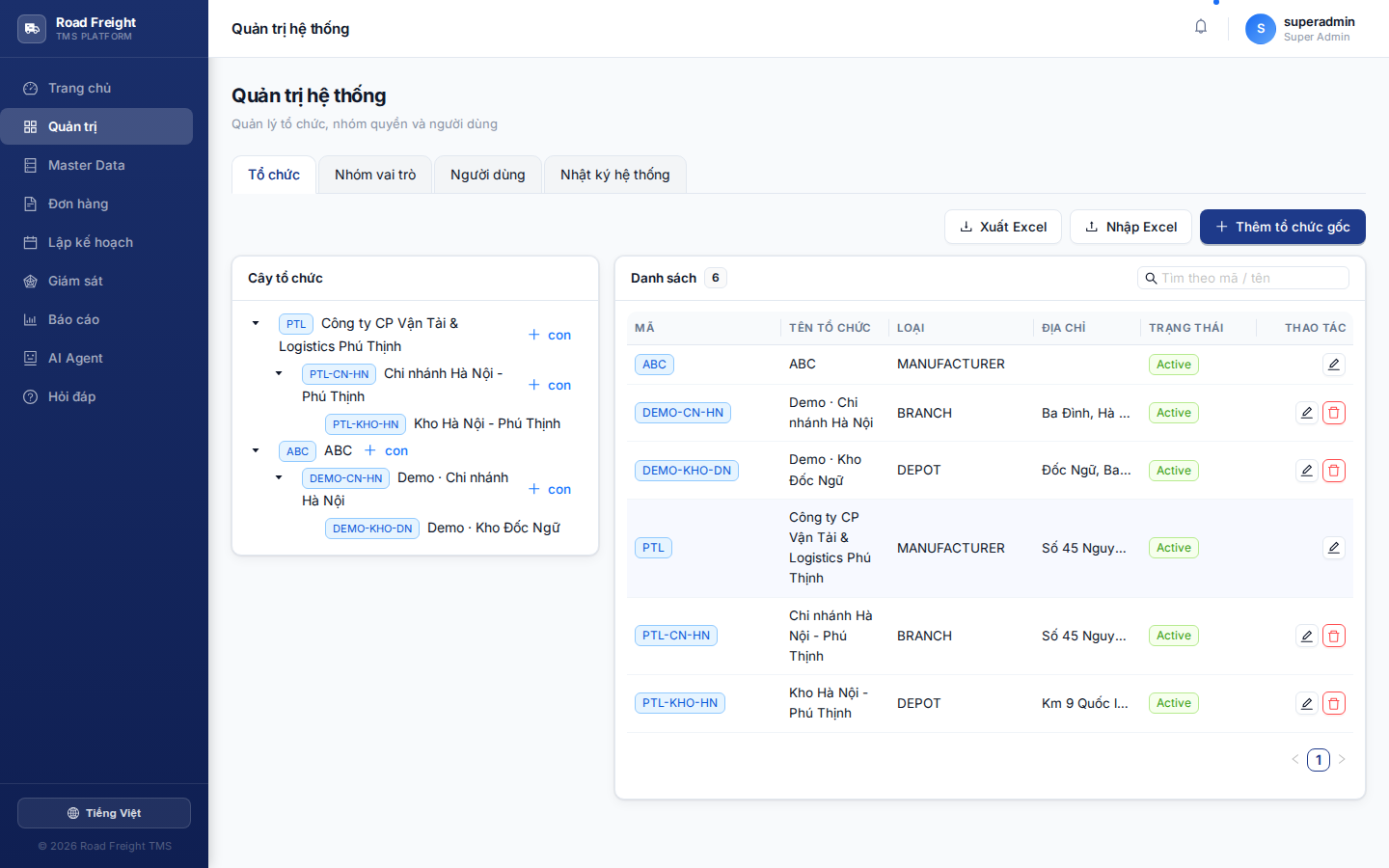
Concepts
ABC Transportation Co. (root)            ← level 1: enterprise
├─ Hà Nội Branch                         ← level 2: branch
│  ├─ Đống Đa Depot                      ← level 3: depot
│  └─ Long Biên Depot
└─ Hồ Chí Minh Branch
   ├─ District 1 Depot
   └─ Bình Tân Depot
3 organization types:
| Type | Purpose | Plans from here? |
|---|---|---|
| Enterprise | Parent company, no delivery operations | ❌ |
| Branch | Regional unit | ❌ |
| Depot | Pickup location with GPS coordinates | ✅ Plans dispatch from here |
Operations
Add a new organization
- Click "+ Add organization" in the top-right
- Fill in:
- Code (XCode): unique, uppercase, e.g.
HN-DONG-DA - Name (XName): full display name
- Type: pick one of the 3 types above
- Parent: choose parent — leave empty if root
- Coordinates (depot only): latitude + longitude — used by the optimizer
- Code (XCode): unique, uppercase, e.g.
Edit / Delete
- Click ✏️ on a row to edit
- Click 🗑️ to delete — cannot delete if the org has users/orders/trips
When a user gets scope Hà Nội Branch, they see data from both child depots (Đống Đa + Long Biên). Permissions auto-cascade to child nodes.
Getting depot coordinates
Accurate coordinates are mandatory for the optimizer to work correctly. Two methods:
Method 1 — Manual: Open Google Maps → right-click the depot location → copy two numbers (e.g. 21.0285, 105.8542).
Method 2 — From address: In the form, after entering "Address", click "Auto-fetch coordinates" — the system calls Nominatim/OpenStreetMap to geocode.
For vague addresses (e.g. "Đống Đa, Hà Nội"), Nominatim returns the district center — not accurate. Enter a complete address with street number.
Next
- Create role groups (RBAC) — Define permissions
- Invite users — Add staff to the organization