Audit log
Every data-modifying action (create, edit, delete, login, export...) is automatically recorded by the system — non-disableable, non-editable. Used for:
- Investigation when something goes wrong ("who deleted order X?")
- Internal control + audits for customers / committee
- Meeting separation of duties requirements for enterprises
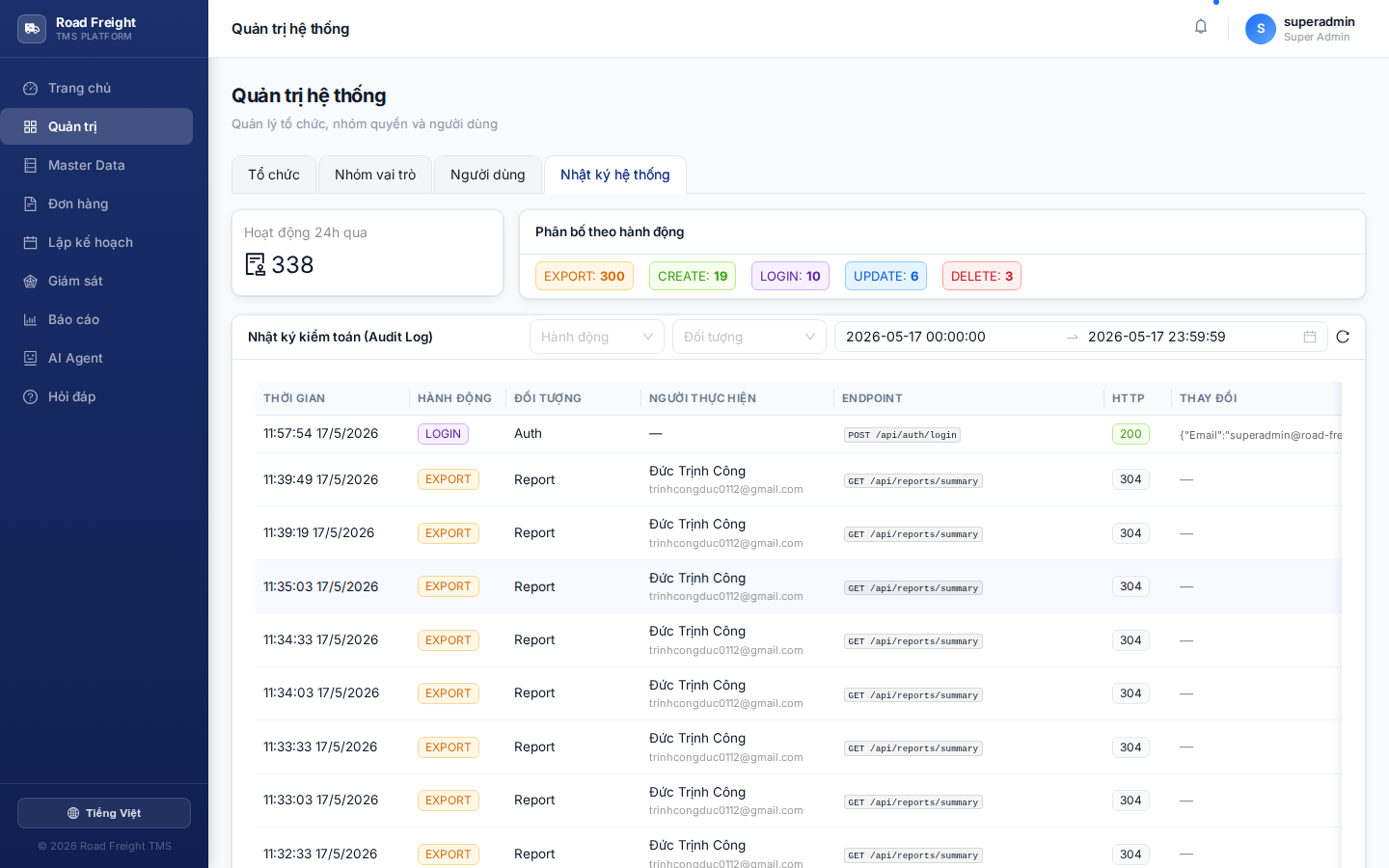
Action types
The system splits 12 action categories:
| Action | When | Example |
|---|---|---|
| 🟢 CREATE | New record | Create order, create user, create route |
| 🟡 UPDATE | Edit record | Update customer address, edit order price |
| 🔴 DELETE | Remove record | Delete driver, delete vehicle |
| 🔵 LOGIN | Successful login | Session tracking |
| ⚫ LOGOUT | Sign out | — |
| 🟣 EXPORT | Data export | Excel report export, order export |
| 🟠 IMPORT | Excel import | Import customer list |
| 🎯 FINALIZE | Finalize routes | Route plan locked |
| 🔒 LOCK / 🔓 UNLOCK | Lock / unlock route | Edit a locked plan |
| ⚙️ OPTIMIZE | Run CVRP optimization | New plan / benchmark |
| 🚚 DISPATCH | Auto-assign drivers | Auto-dispatch run |
| 👤 ASSIGN | Assign driver/vehicle | Manual driver pick |
| ↔️ MOVE_ORDER | Drag order between routes | Move/reorder during planning |
Filters
Multi-criteria filter at the top:
- Time range: defaults to today. Choose any day, week, or month.
- User: search by email or name — view one person's actions only
- Action: tick Action types to view
- Resource: filter by object type (Order, Trip, User, Customer, Vehicle...)
Click "Apply" to refresh.
Reading one log row
Each row shows:
| Column | Meaning |
|---|---|
| Time | YYYY-MM-DD HH:mm:ss (local timezone) |
| User | Email + display name |
| Action | Action type (colored badge) |
| Resource | Affected entity (e.g. Order:ABC-001) |
| Endpoint | Backend URL called |
| Status | HTTP code (200/201/400/404/500...) |
| Duration | Ms — how long the request took |
Click a row for detail with:
- User's IP address
- User-Agent (browser/mobile)
- Before/after diff for UPDATEs — each field's old → new value
Excel export
Click "Export Excel" at the top — downloads .xlsx with all logs matching the current filter. Each row is one action, used for:
- Periodic report to executives
- External archival (compliance)
- Pattern analysis in Excel / Power BI
Who can view Audit Log?
Only IT Admin and users with audit.view permission. Planner/Dispatcher/Accountant cannot — preventing employees from deleting their own logs.
FAQ
Q: Is there a size limit on audit log? A: No hard limit, but the MongoDB collection grows. Recommended periodic archive (e.g. every 6 months) to Excel files, then delete old logs.
Q: Can audit logs be edited?
A: No. The Changes field stores diffs as append-only. No UPDATE endpoint for audit log.
Q: Does the log capture passwords / tokens?
A: No. Middleware auto-redacts sensitive fields: password, passwordHash, token, apiKey.
Next
- User management — See who currently has elevated permissions
- Transportation reports — Aggregated business metrics