Driver payroll
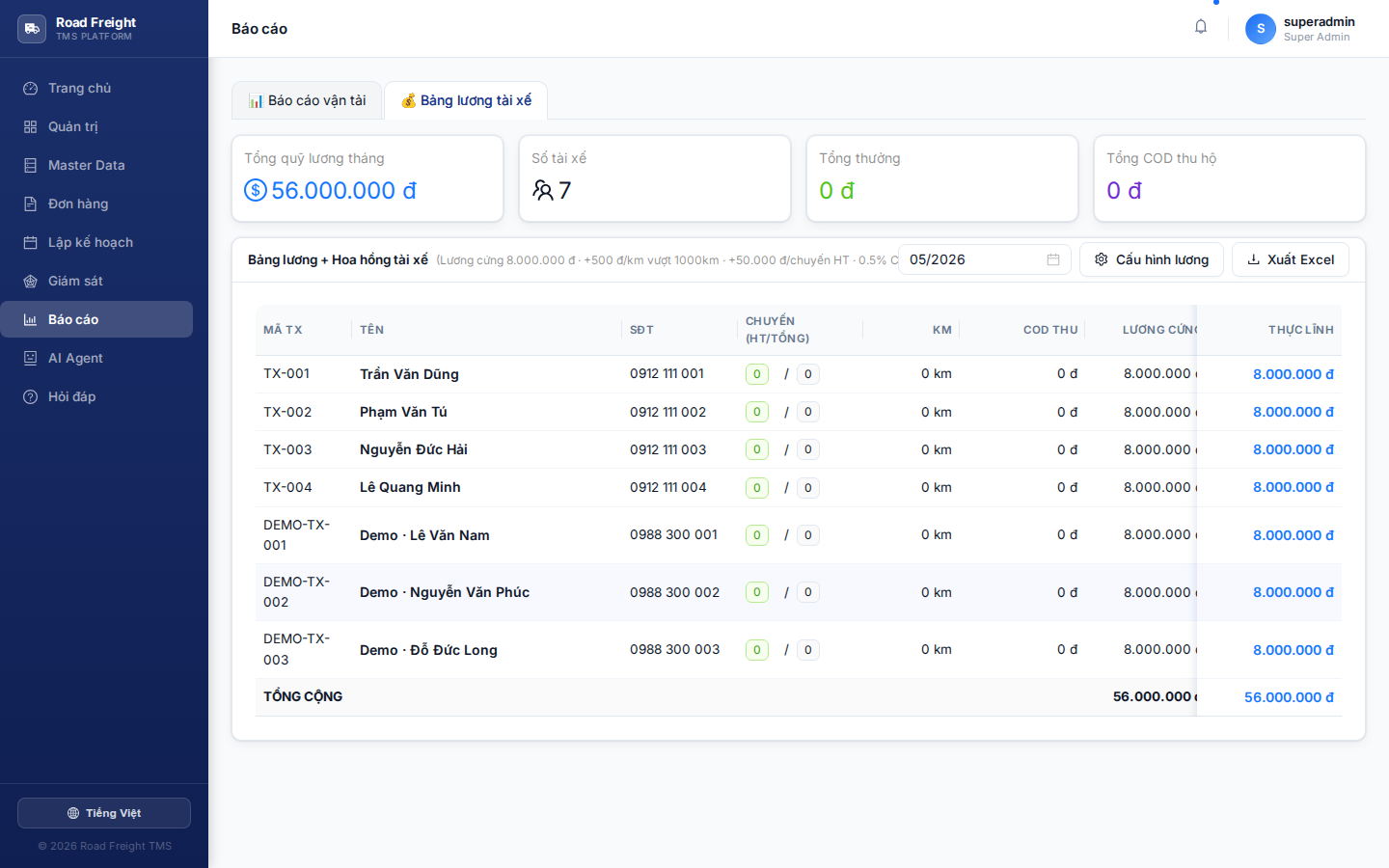
The system automatically computes driver salary from completed trip data. Accountants just review + export Excel for payment.
Payroll formula
Monthly salary = Base salary
               + Distance bonus    (above threshold)
               + Per-trip bonus    (completed trips)
               + COD commission    (% of cash collected)
Each component
| Component | Calculation | Default |
|---|---|---|
| Base salary | Fixed amount per month | 8,000,000 VND |
| Km threshold | Minimum km, no bonus below | 300 km/month |
| Distance bonus | (actual km - threshold) × rate/km | 2,000 VND/km |
| Trip bonus | COMPLETED trips × rate/trip | 30,000 VND/trip |
| COD % | Total COD collected × rate | 0.5% |
The first version had a column to deduct salary for cancelled trips, but it was removed because:
- Cancellations are usually the Planner's fault (infeasible plan) or customer's request — not the driver's
- Penalizing erodes morale when the driver doesn't control the cause
Instead, the system simply doesn't grant bonus for non-completed trips — incentive enough.
Payroll table
Filter
Choose Month (default: current month) → press Apply.
Columns
| Column | Meaning |
|---|---|
| Driver | Name + driver code |
| Completed trips | Count of trips with Status=COMPLETED |
| Total km | Sum(distanceKm) from trips |
| COD collected | Sum(TotalCODCollected) |
| Base salary | From config |
| Distance bonus | (km - threshold) × rate, ≥ 0 |
| Trip bonus | trips × rate |
| COD commission | COD × percentage |
| TOTAL | Sum of all bonus columns |
Summary KPIs
3 summary cards on top:
- 💵 Total payroll due — Sum across all drivers
- 🚛 Total trips — Trip count for the month
- 💰 Total COD — Cash collected on behalf in the month
Edit the formula
Click ⚙️ Settings at the top → modal opens:
| Field | Default |
|---|---|
| Base salary (VND) | 8,000,000 |
| Km threshold for bonus | 300 |
| Bonus per km above threshold (VND) | 2,000 |
| Bonus per completed trip (VND) | 30,000 |
| COD commission (%) | 0.5 |
Edit + click "Save" → applies to the entire organization immediately.
Configuration changes are not retroactive — they only apply going forward. Past months already paid use the old config.
Excel export
Click "Export Excel" → downloads .xlsx:
- 1 Summary sheet — monthly overview
- One sheet per driver — itemized trips contributing to their pay
Used for:
- Printing payroll, signing, archiving
- Bulk bank transfer upload
- Accounting compliance
FAQ
Q: If a driver runs 2 trips in one day, are both counted? A: Yes. Trip bonus counts each Trip record with Status=COMPLETED.
Q: Can I enter driver salary manually? A: Not currently — fully automatic. For special bonuses (e.g. holiday bonus), edit the exported Excel offline.
Q: Who can view payroll?
A: Only Accountant (preset) or users with payroll.view permission. Planner/Dispatcher cannot — preventing conflicts.
Q: Does payroll integrate with COD reconciliation?
A: Yes. The "COD collected" column comes from TotalCODCollected reported by the driver (and, if the reconciliation module exists, from the cash actually counted by the accountant).
Next
- Transportation reports — Total revenue & cost picture